Radar Coverage
Analysis
Calculate where your radar can detect targets over real terrain. Terrain-aware propagation prediction with five planning-grade models, an authoritative browser CPU worker, and professional export — see /methodology for fidelity labels.
Radar coverage analysis predicts detection performance by combining the radar equation with terrain-aware signal propagation. Unlike simple line-of-sight tools, Axiorad models diffraction, atmospheric effects, and multipath to produce accurate coverage maps that account for real-world physics.
What is Radar Coverage Analysis?
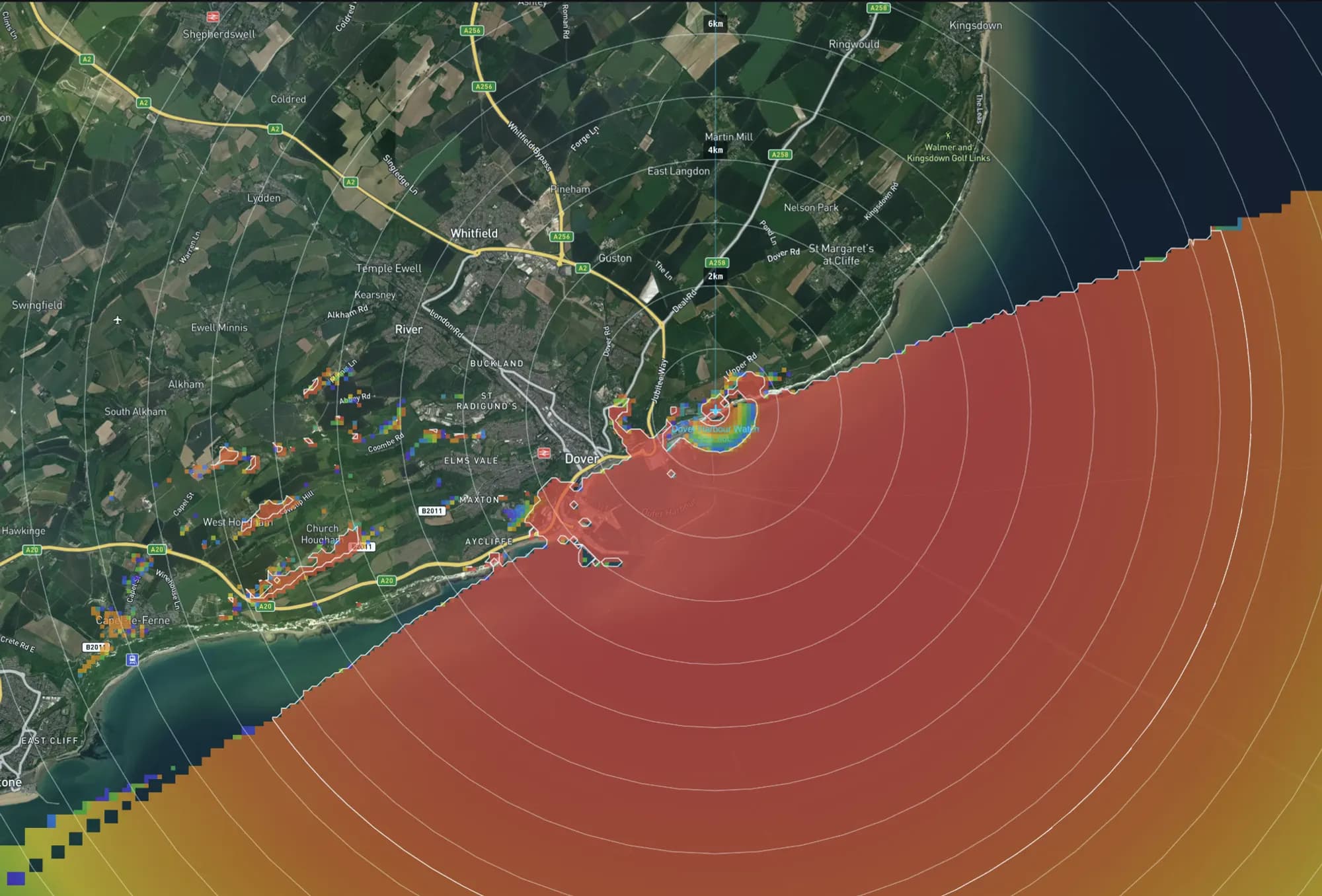
Radar coverage analysis is the process of predicting where a radar system can detect targets within its operational area. It combines the radar equation (which determines detection range based on system parameters and target characteristics) with propagation modeling (which predicts how signals travel over real terrain).
The result is a coverage map that shows detection probability, signal strength, or path loss at every point in the analysis area. Areas behind hills, in valleys, or blocked by terrain features appear as shadow zones — blind spots where the radar cannot detect targets.
Professional coverage analysis is essential for radar site selection, sensor network design, surveillance system optimization, and regulatory compliance. It replaces expensive and time-consuming field measurements with physics-based prediction that can evaluate thousands of configurations before a single antenna is installed.
Key factors in coverage analysis
Terrain Elevation
Hills, mountains, ridges, and valleys block or diffract radar signals. Coverage analysis uses digital elevation models (DEM) to calculate line-of-sight and diffraction loss along every path.
Radar Parameters
Transmit power, antenna gain, frequency, beamwidth, receiver sensitivity, and system losses determine the theoretical detection range before terrain effects.
Target Characteristics
Radar cross-section (RCS), target altitude, and Swerling fluctuation type affect detection probability. A small drone at low altitude is far harder to detect than a cargo vessel.
Atmospheric Effects
Atmospheric refraction bends radar beams (standard 4/3 Earth radius), while absorption at higher frequencies and rain attenuation reduce signal strength.
Propagation Model
The choice of propagation model determines how terrain interaction is calculated. Longley-Rice ITM for irregular terrain, COST-231 for urban areas, P.1812 for area prediction.
How Terrain Affects Radar Coverage
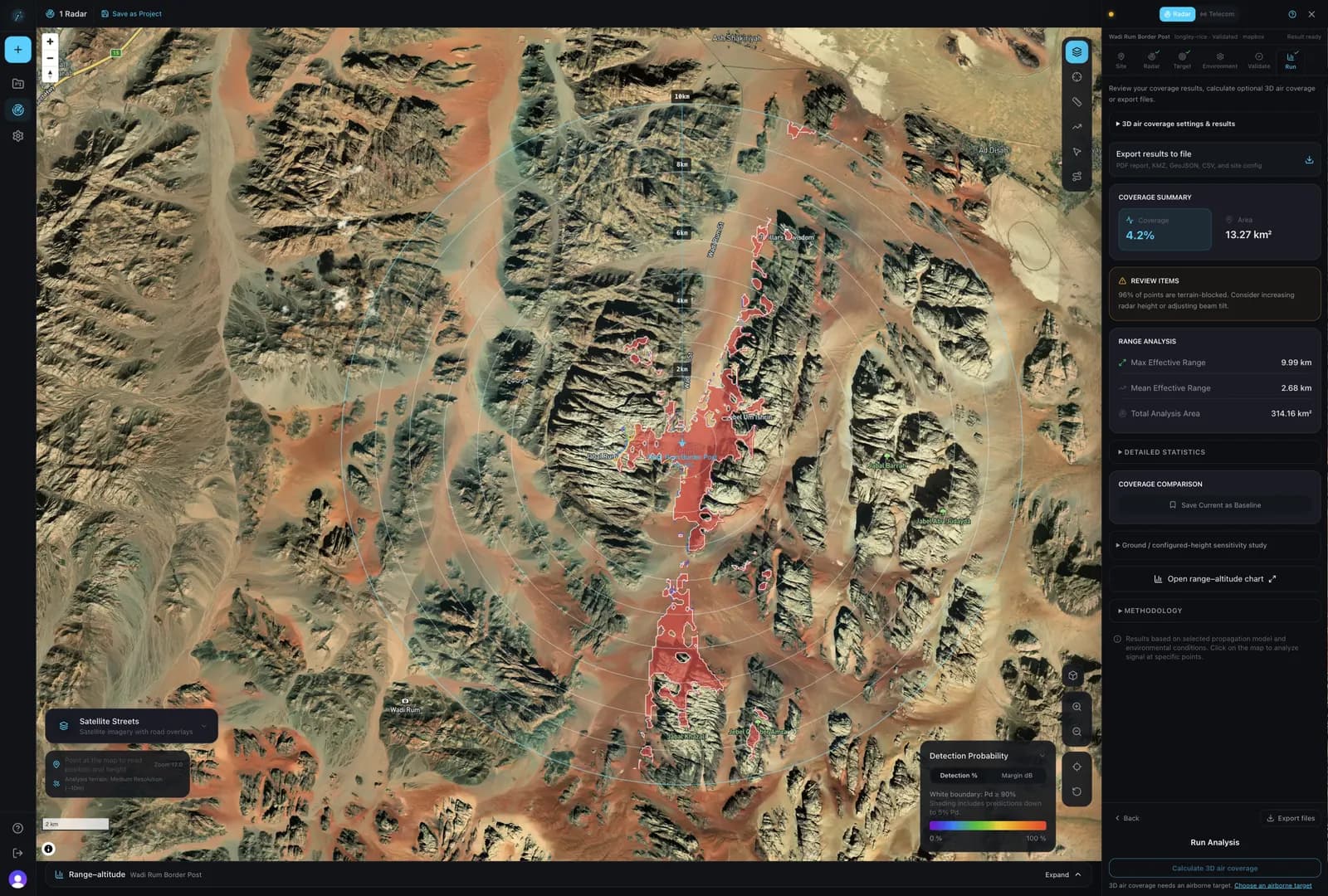
Terrain is the single largest factor in radar coverage. A hill between the radar and the target can completely block detection, while a radar positioned on high ground extends coverage dramatically. Understanding terrain effects is why coverage analysis exists.
Line-of-Sight Blockage
Terrain features physically block the radar beam. The analysis calculates the elevation profile between radar and every grid point to determine if a clear line-of-sight exists.
Diffraction Over Ridges
Radio waves bend around obstacles through diffraction. Models like Longley-Rice ITM and P.1812-6 calculate knife-edge diffraction loss, providing partial coverage into shadow zones.
Fresnel Zone Clearance
Even without direct blockage, terrain that intrudes into the first Fresnel zone causes signal attenuation. The analysis calculates clearance at 32 sample points along each path.
Finding Radar Shadow Zones Before a Site Survey
Model the candidate site over terrain before anyone travels. In Axiorad, place the radar at its proposed mast height, set the target and its height above ground, and calculate coverage: the engine traces the terrain profile from the radar to every grid cell, and cells that fall below the detection threshold are the predicted shadow zones and dead areas. The survey then checks those areas instead of searching for them.
- 1.
Place the candidate site
Put the radar where the survey would go and enter its mast height above ground level. Add a second site in the same project for each alternative location.
- 2.
Define the target
Set the target's radar cross-section and height above ground. Shadow zones for a person on foot differ from those for a vessel or a drone flying at a set height.
- 3.
Calculate over terrain
Choose the elevation source (Mapbox, Google or SRTM) and a propagation model; Longley-Rice ITM suits irregular terrain. The CPU worker checks line of sight, first Fresnel zone clearance and diffraction over ridges along every path.
- 4.
Read the shadows
On the detection probability or signal map, cells below the detection threshold are the predicted shadow zones and dead areas. The results panel gives covered area in km² and maximum and mean effective range. With 3D air coverage, the range–altitude section for a bearing shows how high a target must be before it is detected beyond a ridge.
- 5.
Compare options
Save a result as a baseline, change the mast height or radar settings, recalculate over the same analysis area and compare. The map shows improved and degraded areas in km².
- 6.
Take it to the survey
Export the prediction for the survey team: a draft PDF report on the free tier, or KMZ for Google Earth, GeoJSON, GeoTIFF and CSV with paid simulations.
Limits of the prediction
- The result is planning-grade. The survey confirms or corrects it; the prediction tells the team where to look.
- It is only as good as the elevation data. Whether trees and buildings are in that data depends on the source, and Axiorad does not infer datum or vertical accuracy from it.
- Vegetation and buildings are modelled explicitly only when foliage loss and building obstruction are enabled.
The Coverage Analysis Process
From radar configuration to exported coverage map in five steps. Coverage grids are computed in your browser by the authoritative CPU worker. Map tiles, elevation, authentication, and saved projects use network services.
Configure Radar Parameters
Set frequency, transmit power, antenna gain, beamwidth, and height. Import parameters automatically from a datasheet using AI parsing, or select from the radar preset library.
Select Terrain & Area
Place your radar on the map and define the analysis radius. Choose from multiple elevation sources (Mapbox, Google, SRTM) with resolutions from sub-meter to 90 m. Tile caching enables fast re-analysis.
Choose Propagation Model
Select from five propagation models (ITM, Hata, P.1812, two-ray, free-space) or let the engine auto-select based on frequency, distance, and terrain. Enable environmental effects — atmospheric absorption, rain attenuation, foliage loss, building obstruction.
Run Coverage Analysis
An authoritative browser CPU worker computes coverage across the grid with the selected detector and result-metric contract. Line-of-sight sampling includes Fresnel clearance and ITU-R P.526 delta-Bullington diffraction, with progress tracking and cancel/retry support.
Visualize & Export Results
View results as signal strength, detection probability, path loss, SNR, link margin, or best server maps. Export as GeoTIFF, KML/KMZ, GeoJSON, or CSV. Run route studies and coverage comparisons.
Comparing Coverage From Several Radar or Radio Sites on One Map
Axiorad calculates coverage for several radar or radio sites in one project and shows them on one map. The best-server view colours each cell by the site with the strongest predicted signal and leaves cells that no site covers empty, so gaps between sites are visible at a glance. The point analysis tool lists every site's predicted values at a chosen point.
Several sites, one project
Add sites by hand or import point sites from a KML or KMZ file, up to 100 per file. Telecom and radio tower presets sit alongside the radar presets.
Best-server map
Each cell takes the colour of the site with the strongest predicted signal. Cells no site covers stay empty, which shows the gaps. Available once two or more sites have results.
Radio and radar metrics
Switch the map between signal strength, path loss, SNR, link margin and detection probability, so the same project serves radio links and radar.
Point analysis
Pick a point to list each site's distance, bearing, predicted signal, SNR, detection probability and link margin there.
Route study
Draw a route, such as a patrol road or pipeline, to see each site's coverage and the combined coverage along it, with the longest run of below-threshold samples.
Before and after
Save a site's result as a baseline, change the site, recalculate over the same analysis area and compare improved and degraded area in km².
Site limits per plan are listed on the pricing page.
Beyond Basic Coverage Mapping
Axiorad goes beyond simple line-of-sight analysis. Full radar equation integration, multi-radar network analysis, route studies, and coverage comparison give you the tools to plan and optimize real sensor networks.
Detection Probability Mapping
Calculate probability of detection (Pd) at every grid point using the full radar equation with configurable RCS targets, Swerling fluctuation models (0–4), and noise figure.
Radar equation, Swerling models, Pd, PfaMulti-Radar Network Analysis
Analyze up to 20+ radar sites simultaneously. Composite coverage shows the combined detection envelope of your sensor network with gap identification.
Sensor network, composite coverage, gap analysisBest Server Analysis
Determine which radar provides the strongest signal or highest detection probability at every point. Essential for multi-site network planning and resource optimization.
Best server, dominant coverage, network optimizationRoute Study Analysis
Trace interactive routes on the map and analyze per-radar signal strength and detection probability along the path. Identify dead zones and calculate worst-gap distances.
Route study, dead zone, gap analysis, coverage verificationCoverage Comparison
Snapshot baseline coverage, modify your network, and compare. Diverging color maps show improved and degraded areas with area calculations in km².
Before/after, delta analysis, network modificationEnvironmental Effects
Model gaseous absorption in new CPU runs with P.676-13 Annex 1 line-by-line specific attenuation over a homogeneous slant path; below 1 GHz the recorded method is the explicitly identified legacy P.676-10 planning approximation extrapolated outside that method's documented 1–350 GHz domain. Also model rain attenuation with directional sectors, foliage loss by vegetation type and density, and building obstruction from OpenStreetMap data.
Atmospheric, rain, foliage, building, clutterWhy Web-Based Radar Coverage Analysis?
Traditional radar coverage tools require desktop installation, license management, and separate terrain data setup. Axiorad delivers planning-grade, physics-based analysis in your browser — with honest fidelity labels and a clear security model for what stays local.
| Aspect | Traditional Desktop Tools | Axiorad (Web-Based) |
|---|---|---|
| Platform | Desktop software requiring Windows installation | Runs in any modern browser — Chrome, Firefox, Safari, Edge |
| Setup Time | Download, install, license activation, terrain data setup | Open browser, create account, start analyzing in minutes |
| Propagation Models | Often limited to LOS or single model | Five models: Longley-Rice ITM, COST-231, P.1812-6, two-ray, free-space |
| Radar Analysis | Telecom-focused tools lack radar equation, RCS, detection Pd | Full radar equation with Swerling models and Pd calculation |
| Processing | CPU-bound, can take minutes for large areas | Authoritative CPU worker in-browser |
| Data Privacy | Data uploaded to vendor servers for processing | Coverage compute in-browser; saved projects, maps, terrain, and auth use the network |
| Cost | Hundreds to thousands per license per year | Free evaluation tier, no credit card required |
Learn about the propagation models
Detailed technical reference for all five models: Longley-Rice ITM, COST-231 Hata, ITU-R P.1812-6, Two-Ray, and Free-Space. Comparison table, specifications, and selection guidance.
Start Your Coverage Analysis
Professional radar coverage analysis in your browser. Five propagation models, authoritative CPU-worker calculations, and multi-radar network analysis. Free to start, no installation required.
Free evaluation tier • No credit card required • Data stays in your browser